@SandmanSys you can turn on VPN on host to further disguise your identity. Although personally I never had any real harm with having no VPN but it makes it still a bit safer and stealthier. Especially if you want to pretend to be from a certain country, e.g. I’m German so my VM browser shows German search results without VPN. With VPN set to USA, it looks more believable cuz all my search results are in English.
Ok, twice now when the scammer puts up the “updating” blue screen, its transparent (which I absolutely LOVE btw great job on that) it crashes the VM system.
I have the RAM maxed out for the VM system but it still happens. Any suggestions as to what else I could try ?
Seems to work great except with the webcam. ABSOLUTELY love this feature !
Thanks so much !
Hi! I am trying to find out what the best computer is to buy for this because mine clearly doesn’t have the specs that you specify nor the storage for the vm. Also I am not a tech savvy person so I am trying to find a service where I can not only buy the computer but have them do all of these things you’ve mentioned lol any advice?
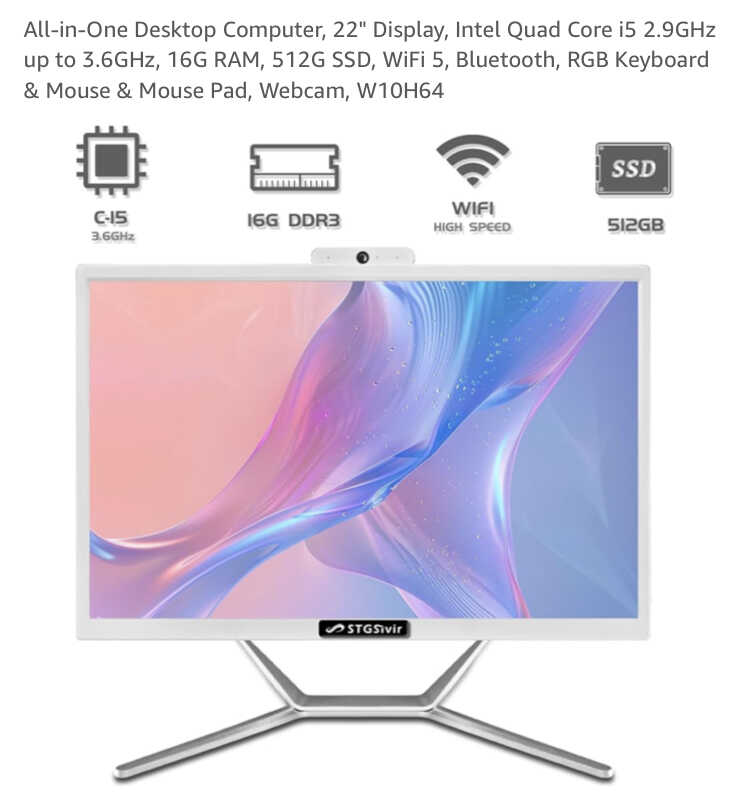
I need help lol I’m not tech savvy but want to do this. I mean I’m a lil older so I know computers but not coding or anything. My first question is what computer would you recommend I buy? Get a build done? I tried to look with some of the specifics you had above but there are so many options and I don’t want to over spend. I tried to email you also.
@pakak Hey! Sorry for the late reply. No clue about the crashes, it doesn’t happen with me. Can you try to re-create the issue and then check on Eventviewer what was the reason for the crash? Press Windows key, type “eventvwr”, right-click and run as admin, then go to Windows Protocols, and check both Application and System logs at that specific time and date when it crashed, make a screenshot or copy the text of what’s written there.
With the RAM, you should not assign too much RAM to the VM, otherwise, your host system doesn’t have enough. 4GB RAM to the VM is enough if you have 8-16GB of physical RAM installed on your host. For testing, you can also assign 6GB to the VM if you have 12-16GB RAM.
What’s with the webcam? Any issue there?
No problem, glad to help 
@FandF Hey! Don’t buy the computer you showed in the picture, it seems to be quite outdated (DDR3 RAM is like 10+ years old by now). I suppose this is from Amazon? Somehow there are a lot of Chinese crap prebuilt computers out there with all the old and outdated, useless parts that nobody wants anymore. I would not buy there.
I’m not sure which country you’re from, I’m just assuming the US now. I’m from Germany so I don’t know all the available tech shops and options but there is Best Buy in the US/Canada, I found some decent system which can run the VM and has a little headroom above for $850: https://www.bestbuy.com/site/dell-inspiron-desktop-3030-intel-core-i7-processor-14-gen-16gb-memory-1tb-ssd-mist-blue/6574637.p?skuId=6574637
Generally, I’d say go for this price bracket of like $700-1000, of course depending on your budget and what other needs you have. Specifically, I don’t think you need a good GPU aka graphics card since you won’t game (I suppose?) so you can save on that. Everything below $700 will likely be too slow or give you an unpleasant experience with the vm so in my opinion, if you are already buying a new PC it should have enough power to do it smoothly.
Maybe if you have any tech savvy guy around you or in your neighborhood, you can also ask him or at the shop.
fucking legend, thank you!!
Kind off new here. And i started setting up my own bait machine using the Jim browning video, however, i found this pre-built VM that is much easier to use. But, here’s the questions: the Win10 looks to be more up to date than the Win11 VM (Pre-made Windows 11 Scambaiting Virtual Machine). is there an up to date one with Win11 as well? Or should i stick with the Win10 that is updated in 2024?
@buggyswimmer Good question! So I put a lot of work into redoing the Win10 VM recently (mid 2024) so that one is the most up-to-date in terms of being stealthy and ready to scambait. The Win11 VM was made before and isn’t as much stealthy but should also work. I would suggest the Win10 from 2024. Maybe if I find time, I will redo the Win11 and get it also up-to-date.
Thanks NeeP. I have downloaded both and started the Win10 setup. Will use that for now. I would love to help to update the Win11 VM.
 VMware Workstation Update Strongly Recommended
Broadcom/VMware released a new version of VMware Workstation version 17.6.3 yesterday, after several critical vulnerabilities were found that allow an attacker to escape out of the virtual machine sandbox. This could mean, a scammer or hacker or a virus that you run inside the VM could escape and attack your host PC. VMware states that exploits are already seen in the wild so it’s strongly recommended to update to the new, patched version.
Download directly from VMware (requires Broadcom account): Please select your identity provider. - Support Portal
Download from my Mega Drive (no login needed): 401.43 MB file on MEGA
For more info on the vulnerability: Support Content Notification - Support Portal - Broadcom support portal

Hello Neep, will the new update interfere with the existing VM’s already in use? Do I have to download the VM’s again?
Hi @jj91, no there will be no interference with the VMs itself. The update just affects the VMware Workstation software which runs the VMs. Anything inside the VM will not be touched/modified. Also I believe the settings you changed in the VMware Workstation software will remain the same. So there’s no risk or inconvenience of updating to the latest version. 
@smoky Unfortunately no. It seems that host and guest have to match in CPU architecture for it to work (source: Vitual Machine Error KB-84273 | Fusion)
Since I created the VM using an x86-CPU (Intel, AMD) it will not work on your Mac with ARM-CPU (Apple M2) unfortunately.
You could create a new VM from scratch by downloading the correct installation file from Microsoft (“Windows on ARM”) and I could give you a list of things I modified to make it more stealthy. But it’s gonna take time and I’m not sure if all the features also work on Apple M2 infrastructure 
Ok, Thanks Neep, I love your VM’s, absolutely fantastic!
@NeeP thanks for the response. I figured this might be the case based on the error message, but wanted to confirm.
Have you heard of more success with Intel based Macs, or is that still unknown? I can give that a try soon.
If not, I think I might be buying a PC
I got it working on the Intel-based Mac wonderfully. I recommend against dual booting the system and just using Microsoft virtual machines.
I used the oldest version available, 13.5.2 of Fusion on my Late 2013 MBP. For those looking for the file path to place the rom, its Macintosh HD>Applications>VMWare Fusion>Contents>Library>roms>x86_x64
It works fine so far, but I’m still thinking a PC is probably the way to go
